Make a Gumroad PDF product in one sitting.
Gumroad PDF Factory finds a niche that sells, writes the PDF, designs the cover and writes the listing. You can check and edit it, then approve it. It goes live on your Gumroad store.
From “I have no idea what to sell” to a finished listing.
With Gumroad PDF Factory you do not prompt, copy files around or run anything. Pick what to do, the app walks you through it one question at a time.
Pick a niche
Type one, or let the AI suggest a few. It searches for ideas, scores them and shows you the ones worth making.
Create the PDF
Choose the full guide or a short one of about 10 pages. Already have a PDF? Drop it in, or get it checked and fixed first.
Get the cover and listing
The cover, thumbnail, title, description and tags are made to match your PDF. Edit anything you like.
Approve and publish
Edit it in the built-in editor, save a Gumroad draft or approve it live. Then make ads and posts to sell it.
See it before you sign up.
These are real screens from the cloud app. No design or writing skills needed.
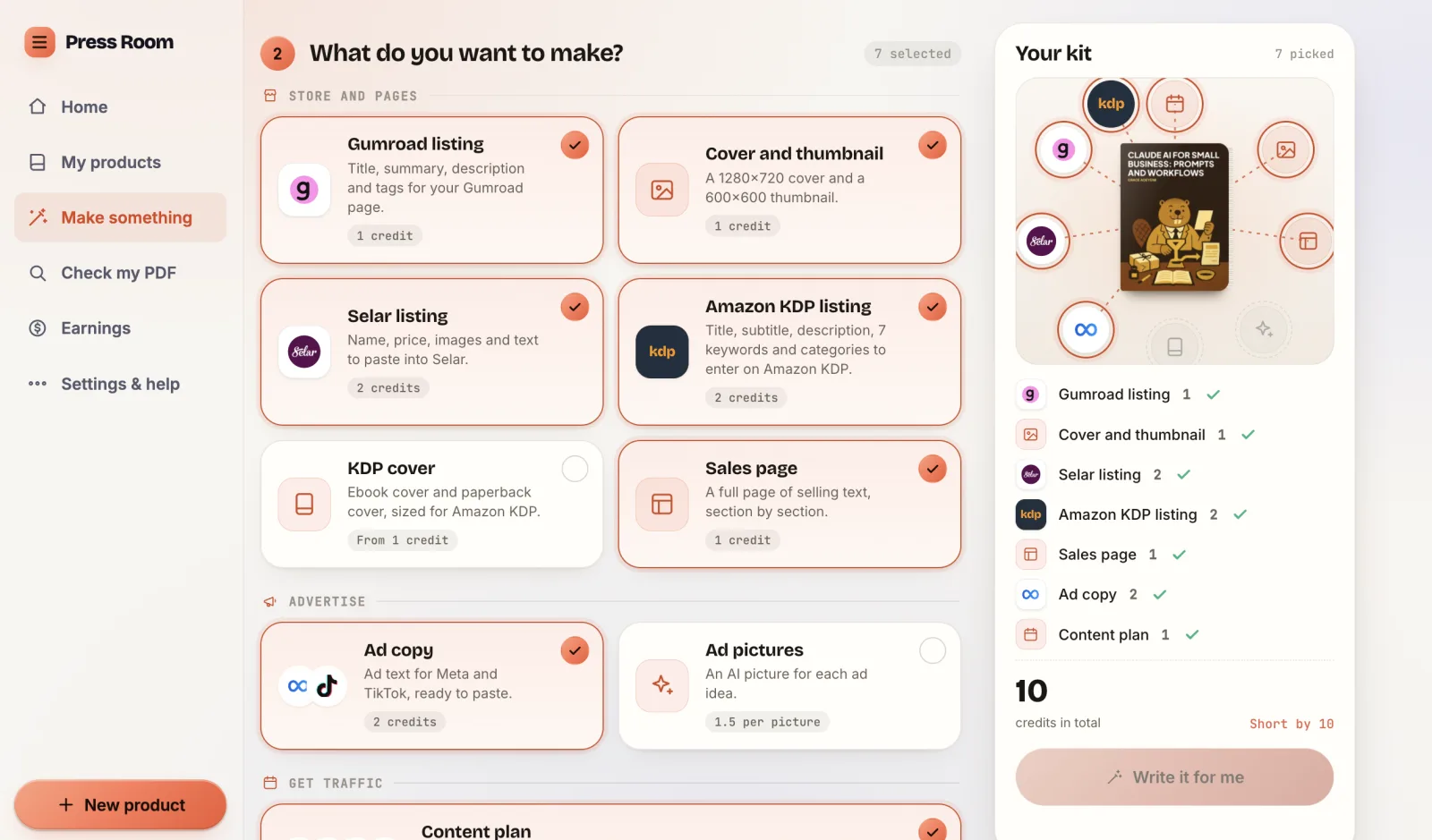
Pick what you want, see the price first.
Tick the listing, cover, ads and content plan you need. The kit on the right shows every credit before you confirm.
- Gumroad, Selar and Amazon KDP listings
- Cover, thumbnail and sales page
- Ad copy for Meta and TikTok
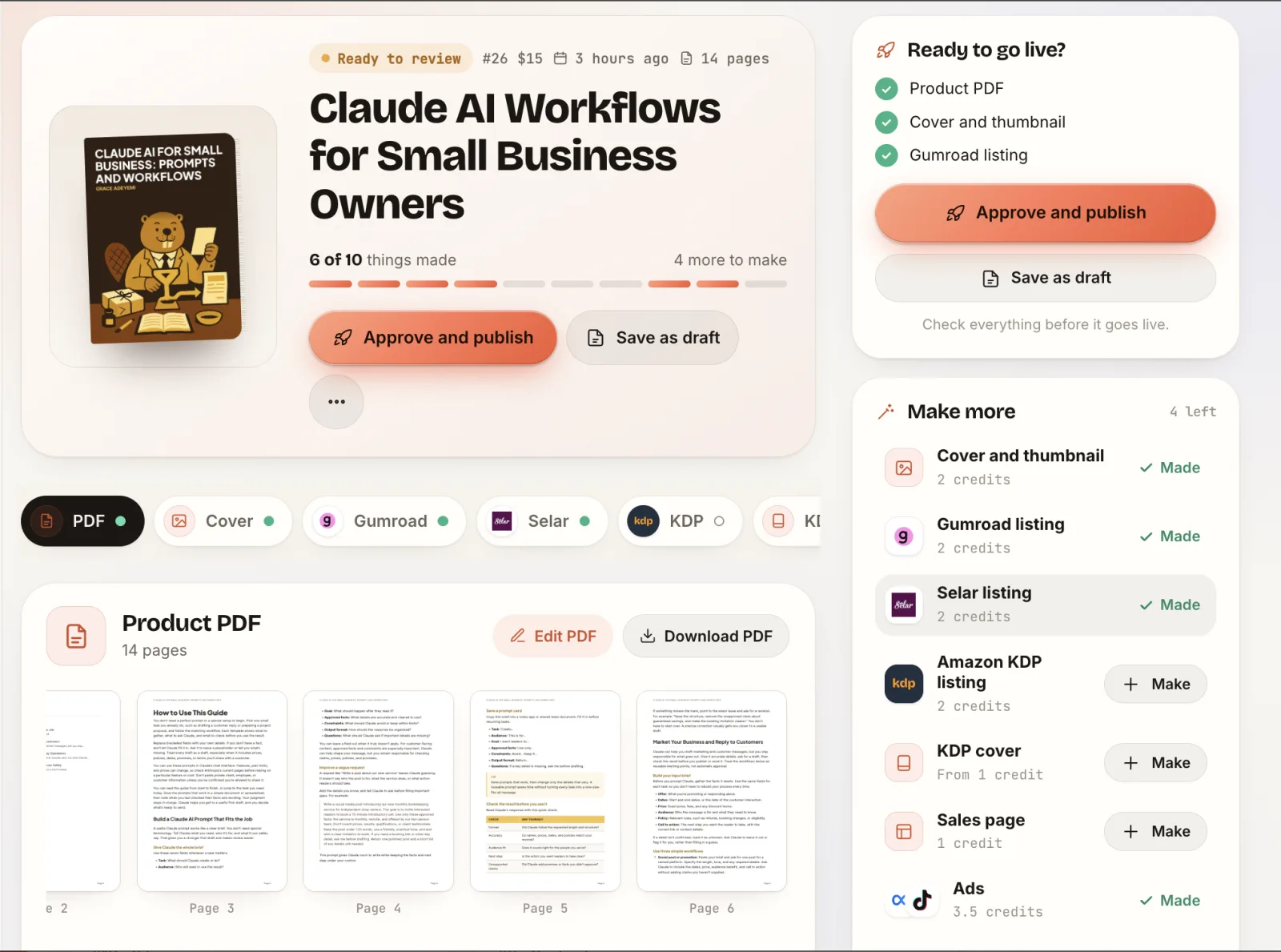
Everything for one product, in one place.
Open a product and see the PDF, cover and every listing side by side. Make what is missing, then approve it live or save a draft.
- Check each piece before it goes live
- Approve and publish to Gumroad
- Save as draft if you want to wait
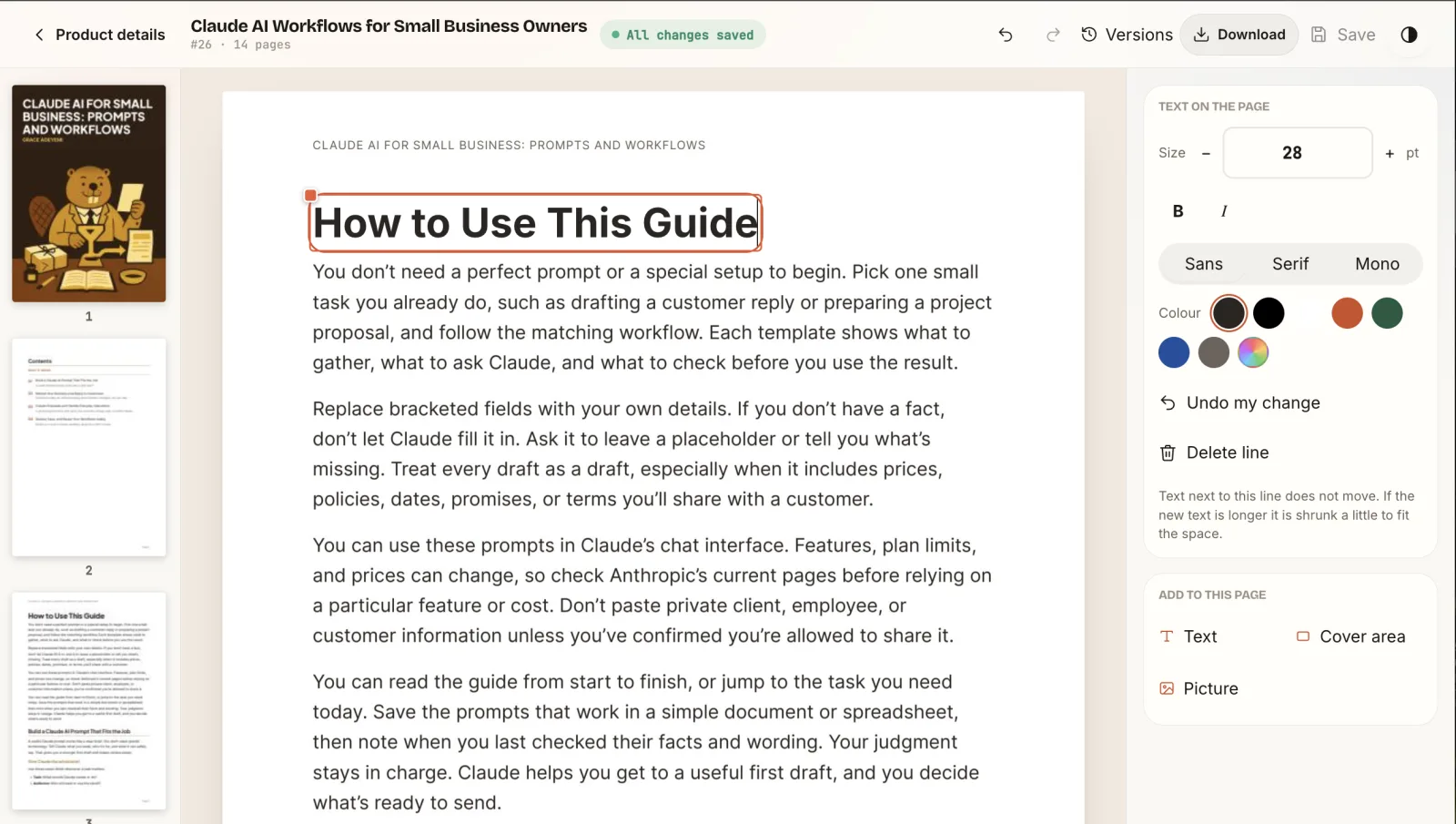
Fix a line without leaving the app.
Click any text on a page to change its words, size, font or colour. Undo, view older versions and download the PDF when you are done.
- Edit text, add pictures and cover areas
- Undo and version history
- Download the finished PDF
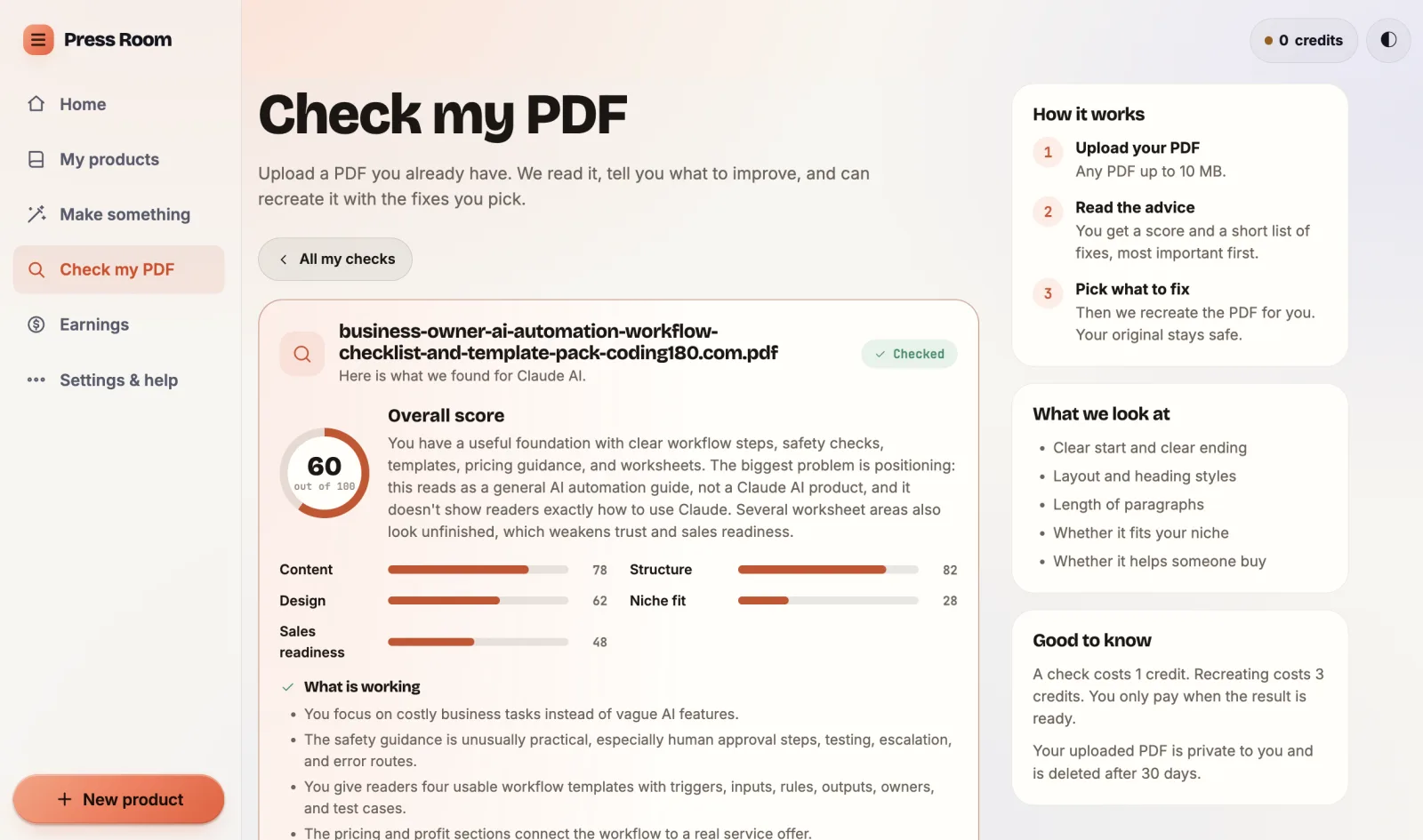
Already have a PDF? Get a score and a fix list.
Upload it and get a score for content, design, niche fit and sales readiness, with the most important fixes first. Then recreate it with the fixes you pick.
- Plain advice, no jargon
- Your original file stays safe
- A check costs 1 credit
Everything between the idea and the sale.
Gumroad PDF Factory builds the files, checks and edits them, then helps you sell them.
Niche research that scores ideas
Not a blank page. You get a short list of PDF ideas with a score for each, plus the near misses so you can see why they were cut.
Sample scores for illustration.
Full PDFs, not outlines
A complete guide or a short about-10-page one, ready to sell. Fix anything in the built-in editor, with version history.
Cover and thumbnail
Sized for Gumroad: a 1280×720 cover and a 600×600 thumbnail.
Gumroad listing copy
Title, summary, description and tags written from the PDF itself.
Publish from the app
One tap saves a draft on Gumroad. A second approval makes it live.
Ads for Meta and TikTok
Ad copy and a picture for each idea, in carousel or Reels size, built from your finished product.
Content plan
A 3 to 30 day plan for X, TikTok, Reddit, Pinterest, Instagram and your blog.
Earnings in one place
See copies sold, revenue and your latest buyers without leaving the app.

Sales page and Selar
Three sales page styles, and a ready listing for Selar in your own currency with its 300x300 image.
Amazon KDP listing and covers
Title, subtitle, description, 7 keywords and categories, plus an ebook cover and a paperback cover sized for KDP.
PDF checker
Upload a PDF you already have. Get a score and a list of fixes, then pick what to fix and it is recreated for you. Your original stays safe.
Make anything from your PDF
Pick a product, tick what you need, and get listings, ads, a sales page and posts in one go. Set your brand colours once and every file uses them.
One PDF. Three places to sell it.
Gumroad, Selar and Amazon KDP are all built in. Make the product once and get everything each store asks for.
Gumroad
Publish from the appConnect your store once and the sales go to you.
- Title, summary, description and tags
- 1280×720 cover and 600×600 thumbnail
- Save a draft, then approve it live
Selar
Ready to pasteBuilt for buyers in Africa and local currencies.
- Name, description and category from Selar's list
- Your price in your own currency
- 300×300 image
Amazon KDP
Ready to enterTurn the same PDF into a book listing.
- Title, subtitle and description
- 7 keywords and categories
- Ebook cover and paperback cover
Run it on your own server.
Open the dashboard and start today. Or get the complete Self-Hosted Edition for a one-time $100, install it on your own server and keep everything private. Your products, keys and data stay with you, and the software is yours to keep.
Pay only for what you make.
No subscription for Gumroad PDF Factory. Each step shows its price before you confirm it. $1 = 10 credits, and you can top up from $1.
Use credits
Top up once and run any step. We handle the AI. If a step fails, you are not charged for it.
Use your own key
Save your own AI provider key and the app runs on it. Your runs then cost no credits.
Build your own estimate
Tick the steps you plan to run. Credits are used only when you run a step.
One finished product (find an idea, write the full PDF, make the cover and listing): 5 credits, about $0.50. Running on your own AI key costs no credits.
People are already shipping with it.
“I used to spend too much time trying to figure out what digital product to create. Gumroad PDF Factory gives me a more structured way to research ideas and turn them into products.”
“Creating a digital PDF involves more than writing. Having the research, content creation and product preparation tools together makes the process easier to manage.”
“One thing I like is being able to explore product niches before investing time in creating a PDF. It helps me approach digital product creation with a clearer plan.”
“Instead of jumping between different tools for every step, I can manage more of my digital product workflow in one place. That makes the process feel much more organized.”
“I like having the opportunity to review my product before publishing it. It gives me more control over what goes into my store rather than leaving everything to automation.”
Before you start.
Quick answers on publishing, selling and pricing.
Yes. The Self-Hosted Edition is the complete Gumroad PDF Factory for a one-time $100. You host it on your own server, keep your data and keys to yourself and own the software. The cloud app is still there if you would rather not set anything up. Use the Buy now link or message us from the contact page and we will send it over.
Yes. Upload any PDF and the app reads it, gives it a score and a short list of fixes, most important first. Pick the fixes you want and it recreates the PDF for you. Your original stays safe.
Yes. There is a built-in editor where you change pages, swap images and fix text. Every save keeps a copy, so you can open the version history and restore an earlier one.
The app writes the KDP listing for you: title, subtitle, description, 7 keywords and categories. It also makes an ebook cover and a paperback cover sized for KDP. You enter them in your own KDP account, because KDP has no publish link.
Yes, you can get started with free AI options if your account has available credits or you connect a supported free AI API. The amount you can create depends on your available credits, the AI model you use and the cost of each operation.
Yes, to publish. You connect it once in Settings and the sales go to your store. You can also download the PDF and the images and upload them yourself.
Yes. Once your PDF is built, the app writes a Selar listing with the name, description, category, price in your own currency and a 300x300 image. Selar has no publish link, so you paste it into your Selar store yourself.
Yes. Once your PDF is built, the app writes ads for Meta and TikTok: the ad text, the headline and a picture for each idea, in your own words and tone. You then upload them to your own ad account. The app does not spend money or launch campaigns for you.
The app gives you a ready plan instead of a blank calendar. Pick 3 to 30 days and it writes posts for X, TikTok, Reddit, Pinterest, Instagram and your blog, all about your product. It can also write a sales page, and a Selar listing if you sell there. Ads are one more option. Results depend on your niche and how consistently you post, so we do not promise sales.
Yes. Drop in a PDF you already have and the app makes the cover, the thumbnail and the listing for it, so you do not need to build the product again from scratch. It is saved as a draft first, so you can check everything before it goes live. From there you can publish it to your Gumroad store, or use the Selar listing the app writes for you.
The platform is designed to help you prepare PDF products and their supporting assets. Available options may include content generation, document formatting and cover creation. Review the final PDF before selling it to make sure the content, layout and branding meet your standards.
Yes. You can connect your own OpenRouter API key and use supported free AI models to create digital products. OpenRouter offers models with a :free variant, subject to availability and usage limits. Free models may have rate limits, and availability can change. You can also choose paid models when you need more advanced capabilities. Other AI providers work too if your preferred provider and model are supported: you can connect your own key to use the provider free-tier allowance. Free-tier limits, usage quotas and provider charges still apply, and some providers may require billing details even when offering free usage.
Still unsure? Message support.
Your next Gumroad product is one tap away.
Open the app, pick a niche and watch it get built.
Open Gumroad PDF FactoryNo install. Sign in with your Coding180 account. Prefer your own server? Get the Self-Hosted Edition for $100.