I Updated my Claude Chrome Extension REA with Skills, Connectors and File Upload - Download free
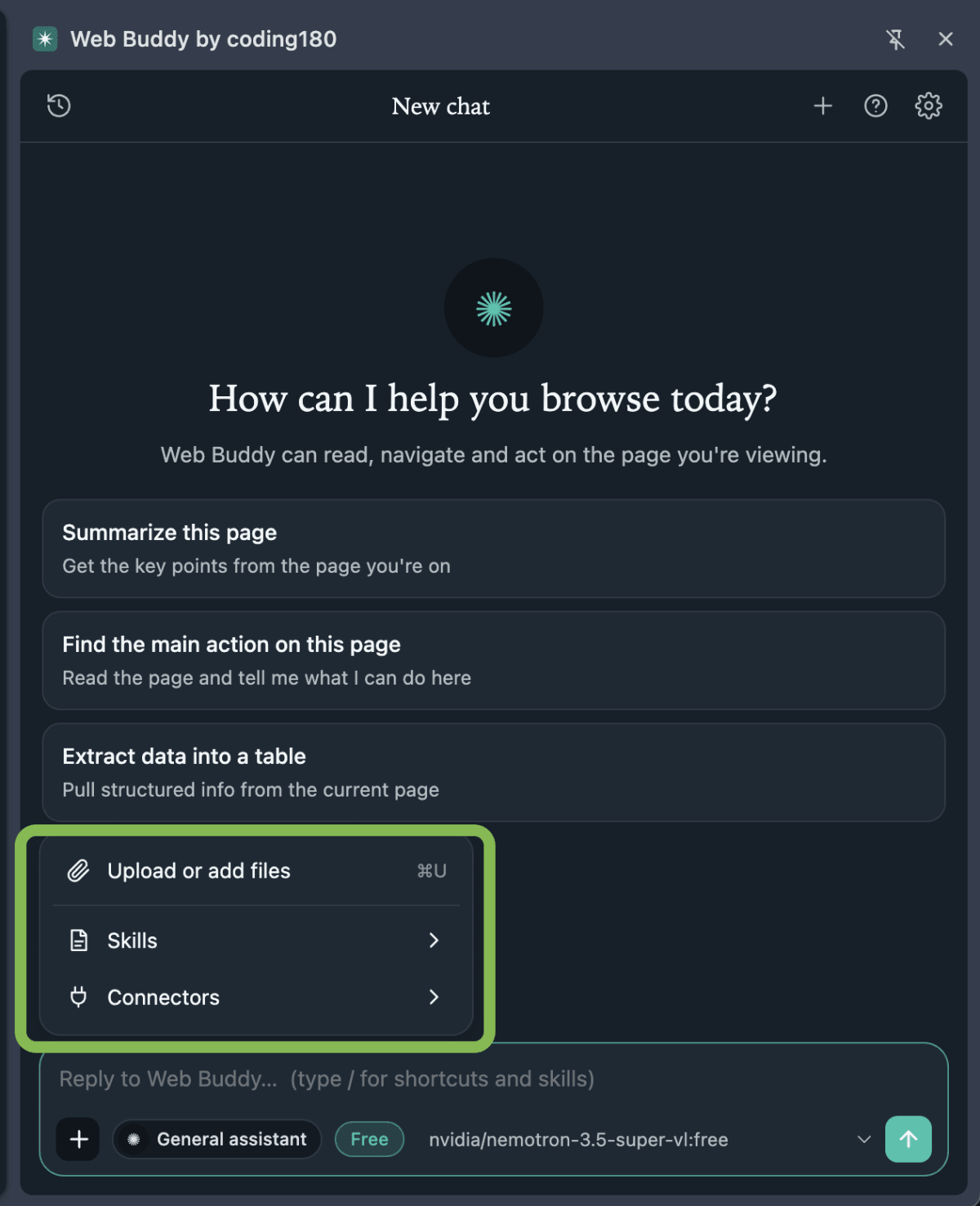
What is new in this update:
- Upload or add files: click the + button next to the chat box, or press Cmd+U (Ctrl+U). You can also drag a file onto the message box or paste an image. Images and text files (txt, md, csv, json, code) work, up to 8 MB each.
- Skills: add your own
SKILL.mdfiles in Settings, or pick one from the + menu. Type/in the chat to find one fast. A few come built in, including one that writes new skills for you. - Connectors: switch on the web page reader, Wikipedia, weather, Hacker News or GitHub with one tap. No extra keys needed.
- Custom MCP servers: paste the URL of any remote MCP server that speaks streamable HTTP, add a bearer token if it needs one, and its tools become available to the model.
Here is how to run it yourself.
Step 1: Download the project
The zip is attached here. Download it and unzip it, and you get a folder called web-buddy-claude-chrome-extension. If you already have the first version, replace the old folder with this one. There is nothing to install or build, it is plain extension files.
Step 2: Get an OpenRouter key
Create a free account on openrouter.ai, open the Keys page and make a new key. Keep it somewhere safe, you will paste it in Step 4. If you already added a key before, it is still saved in your browser.
Step 3: Load it into Chrome
- Open
chrome://extensions - Turn on Developer mode (top right)
- Click Load unpacked and select the project folder (or click the reload icon on the extension if you are updating)
- Reload the page you want to test on
Step 4: Add your key
The settings page opens by itself after install. Paste your key, click Save API Key, then Test connection. Choose Free or Paid models, and pick one that supports tool calling, because that is what lets it act in the browser and use connectors. Free models can be weak with tools, so if a connector fails, switch the model before you blame the setup.
Step 5: Try the new + menu
Click the toolbar icon, or press Cmd+E (Ctrl+E), then click the + button next to the chat box.
- Upload or add files: drop in a CSV and ask for a summary.
- Skills: type
/and pick a skill, or add your ownSKILL.mdin Settings, then Skills. - Connectors: switch on GitHub and ask about a repo you are curious about.
Step 6: Add your own MCP server (optional)
Open Settings, then Connectors. Under Custom MCP servers, type a name, paste the Server URL, add the Bearer token if the server needs one, and click Connect.
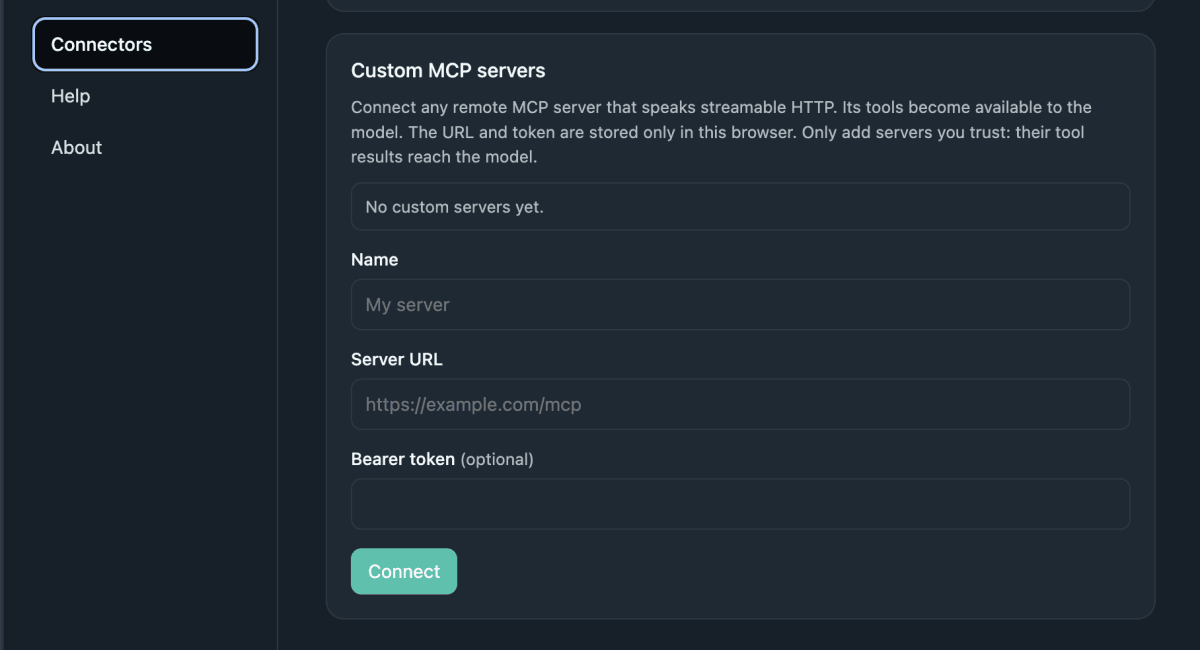
Only add servers you trust. Whatever a server returns goes straight to the model, and your URL and token stay in your browser, so treat them like passwords. Leave "Ask before acting" ticked at first so it asks before it clicks anything.
The prompt I used to build it
Update the Web Buddy Chrome extension. Add a + menu next to the chat box with: Upload or add files (Cmd+U, drag and drop, paste images), Skills (SKILL.md files, a / picker in the chat, and a built-in skill that writes skills), and Connectors (web page reader, Wikipedia, weather, Hacker News, GitHub). In Settings add a Connectors page where I can connect any remote MCP server over streamable HTTP with a name, URL and optional bearer token. Keep the OpenRouter setup working.
/reverse-engineer-anything
If you want to build something like this yourself, the full step-by-step is in our tutorial section https://coding180.com/tutorials/reverse-engineer-any-app-rea.
Want to build your own version?
The extension above is free to download. If you would rather build your own from scratch, I put together the whole build as a course: Build Your Own Claude Chrome Extension With REA AI. It has every prompt I sent, from the first one-shot rebuild to the last bug fix, the screenshots before and after each change, and five fill-in prompts you can reuse on an extension you are allowed to study. It is a small paid download, so you can follow my exact steps and end up with your own extension.
4 Replies Oldest first Newest first
Thank u. Was waiting for this
thank you
Thanks for the pushing the update
Hi guys i'm danny from Ethiopia