I Reverse Engineered the Claude Chrome Extension using REA - Download free

I used the Reverse Engineer Anything (REA) repository to build my own version of the Claude side-panel agent for Chrome. I have now updated it and called it Web Buddy. It sits next to any page, reads it, clicks, types and fills forms for you. You bring your own OpenRouter key and pick the model. I built it to learn how apps like this are made, so treat it as educational.
What is new in this update:
- Free models: a Paid / Free switch in settings. Free models cost nothing, and only the ones that pass a live check are listed. If the current one is rate limited, Web Buddy switches to another working one by itself.
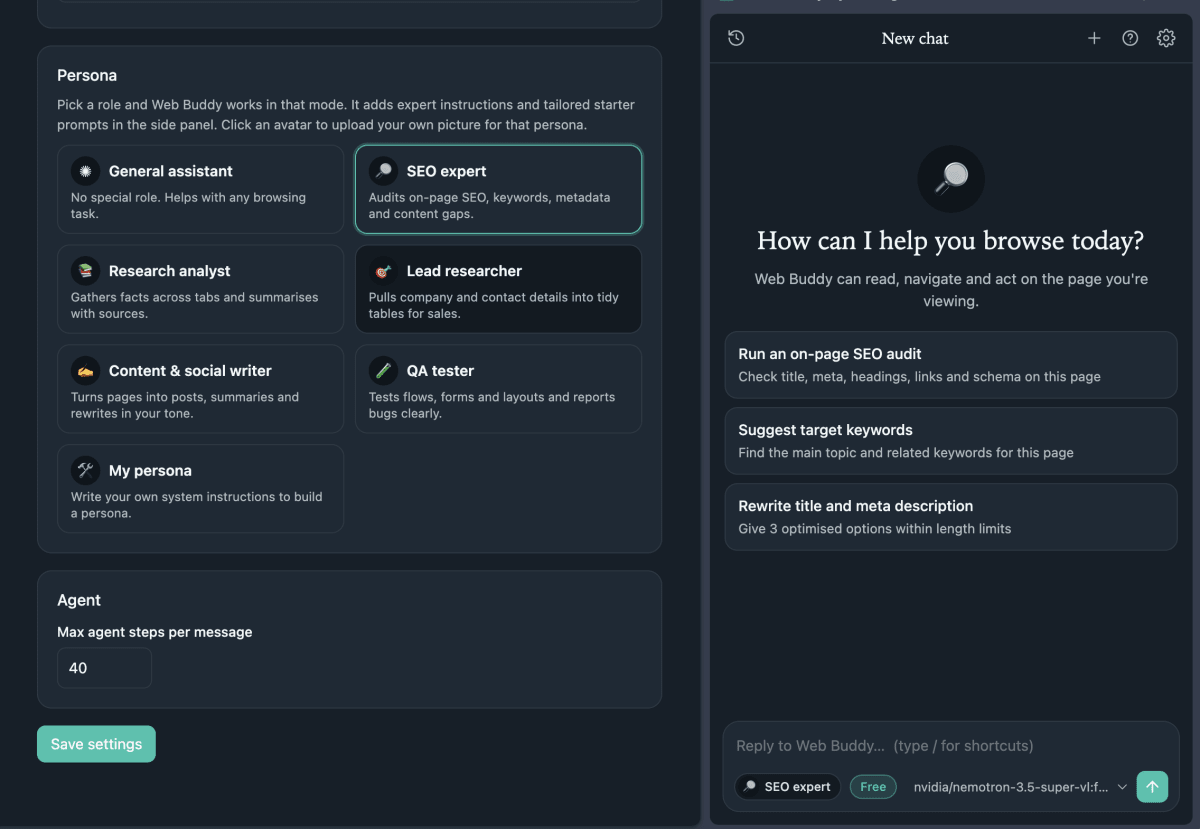
- Personas: pick a role such as SEO expert from the side panel, each with its own avatar and starter prompts. You can also make your own.
- Model picker in the chat box: change the model without leaving the conversation.
- Light and dark themes, chat history and a stop button.
Here is how to run it yourself.
Step 1: Download the project
The repository is linked here. Download it and unzip it. There is nothing to install or build, it is plain extension files.
Step 2: Get an OpenRouter key
Create a free account on openrouter.ai, open the Keys page and make a new key. Keep it somewhere safe, you will paste it in Step 4.
Step 3: Load it into Chrome
- Open
chrome://extensions - Turn on Developer mode (top right)
- Click Load unpacked and select the project folder
Step 4: Add your key
The settings page opens by itself after install. Paste your key, click Save API Key, then Test connection. Leave the Base URL as it is. Then choose how you want to pay:
- Free: costs nothing. Click Re-check and Web Buddy tests the free models live, then lists only the ones that work (I got 8 verified). Free models are often rate limited, so it moves to another one when the current one fails.
- Paid: type any OpenRouter model ID and it is sent as it is.
Whichever you use, pick a model that supports tool calling, because that is what lets it act in the browser. If you want it to understand screenshots, pick one that supports images too. The Extra models box lets you add more IDs to the picker, one per line.
Step 5: Open the side panel and try it
Click the toolbar icon, or press Ctrl+E (Cmd+E on Mac). Open any page and try "Summarize this page", or pick a persona like SEO expert and run an on-page SEO audit. The persona, the Free or Paid tag and the model sit under the chat box, so you can switch them any time. Leave "Ask before acting" ticked at first, so it asks before it clicks anything. Chrome will show a debugging banner while it works, that is normal.
The prompt I used to build it
Reverse-engineer Claude chrome extension and build a working alternative with similar pages, design, navigation, and functionality. I should be able to configure and use openrouter api.
/reverse-engineer-anything
If you want to build something like this yourself, the full step-by-step is in our tutorial section https://coding180.com/tutorials/reverse-engineer-any-app-rea.
Got any issues? drop it here
47 Replies Oldest first Newest first
Please I need help
thanku broe i hope this works, other u e good mentor
hi
Hello everyone
Thanks for sharing this, its such a great resource
It says I need a paid open router account the free api keys i got is not working on the claude
Reply
Download the updated file. U can now use free openrouter
OK, vou testar o repositorio, parece ter ficado excelente.
Trying out now
Sure
am now trying to download it