By the end of this tutorial you will have an AI research assistant inside Claude: a project that searches the web, reads your own documents, shows a source for every claim, says "not found" instead of guessing, and turns what it finds into a one-page brief you can act on.
You need a Claude account (the free plan works for everything except the optional deep Research step) and about 35 minutes. You do not need to code. The assistant is a Claude Project, a workspace that remembers your instructions and files.
If Projects is new to you, my Claude Projects guide explains it.
1. Write one research question and a short brief
Most bad research starts with a vague question. "Tell me about bread subscriptions" gets you a generic essay. "Should my bakery start a weekly bread subscription, and what would people pay?" gets you something you can decide on.
Before you open Claude, write a five-line brief: the question, the decision it feeds, what you already know, which sources you trust, and when you need the answer. In this tutorial I use a made-up business, Northside Bakery, so replace every detail with your own.
The brief does two jobs. It tells Claude what "done" looks like, and it gives you a test for every answer later: does this help me make the decision, yes or no?

2. Create the research project
Open Claude and click Projects on the left side, or go to claude.ai/projects. Click + New Project, call it "Research assistant" and add a short description.
Anthropic's help article on projects notes that Claude does not see the name and description, so they are only for you.
Use one project for one area of research, such as "Bakery growth" or "Supplier checks", not one per question. That way every chat in it shares the same instructions and the same files, and your past findings stay close.
Projects work on free accounts with a limit on how many you can create. See Is Claude AI free? for what changes on a paid plan.

3. Give it research rules
Click Set project instructions, paste the text below, change what is in brackets, and click Save instructions. These rules are what turn Claude from a confident writer into a careful researcher.
You are my research assistant. You help me answer business questions with evidence I can check.

Rules:
1. Every factual claim needs a source: a link from your web search or the name of a file in this project. No source, no claim.
2. Label each point as Fact (with source), Estimate (say how you got it) or Opinion.
3. Give the date of each source when you can see it. Flag anything older than [two years].
4. If you cannot find something, write "Not found". Never guess or fill the gap.
5. Prefer primary sources: government sites, official company pages, original studies. Say clearly when you only found blogs or forums.
6. When sources disagree, show both, then say which you trust more and why.
7. Answer in this order: the short answer in three sentences, then the evidence, then what is still unknown.
8. Research businesses, markets, products and topics, not private individuals. If I ask for personal details about a person, remind me of this rule.
Rule 8 matters. Anthropic's usage policy prohibits compiling personal data from multiple sources to build profiles of individuals, so your research assistant studies markets and companies, not people.
My 5-element prompt formula explains why short, numbered rules like these work better than a long paragraph.

4. Turn on web search and ask your first question
Open a new chat inside the project. Click the + button in the lower left of the chat box and choose Web search, so a checkmark appears next to it.
Anthropic's web search help article explains this, and notes that in the newest Claude app there is no toggle because Claude searches the web on its own when it helps.
On Team and Enterprise plans, an owner has to switch web search on for the workspace first.
Now paste your question with the brief from step 1:
Question: Should Northside Bakery start a weekly bread subscription?
Decision: launch a small trial in two months, or not.
What I know: two shops, about 300 regular customers, we already take online orders.
Find: how other small bakeries run bread subscriptions, what they charge, how pickup or delivery works, and the most common reasons they stop.
Use web search. Follow my research rules.
The answer comes back with citations, small links next to the claims. Each one points to the page that claim came from.

5. Add your own documents
The web knows about bakeries in general. Only you know about your bakery. In the project's knowledge area on the right, click + and add the files that matter: a sales export, a customer survey, your price list, a report you paid for.
Anthropic's upload help article lists the file types and size limits.
Then ask Claude to use them, and to quote them, so you can find the exact line:
Using only the files in this project, what do our numbers say about demand for regular bread orders? Quote the exact line and name the file for every point. Then compare it with what you found on the web in the last chat.
Do not upload anything you would not want a stranger to read, such as customer phone numbers or staff records. Remove those columns first.

6. Go deeper with Research (paid plans)
For a big question, one web search is not enough. Claude's Research mode runs many searches that build on each other and looks at the question from several angles.
Anthropic's Research help article says it is on paid plans (Pro, Max, Team and Enterprise), needs web search turned on, and uses your limits faster than a normal chat.
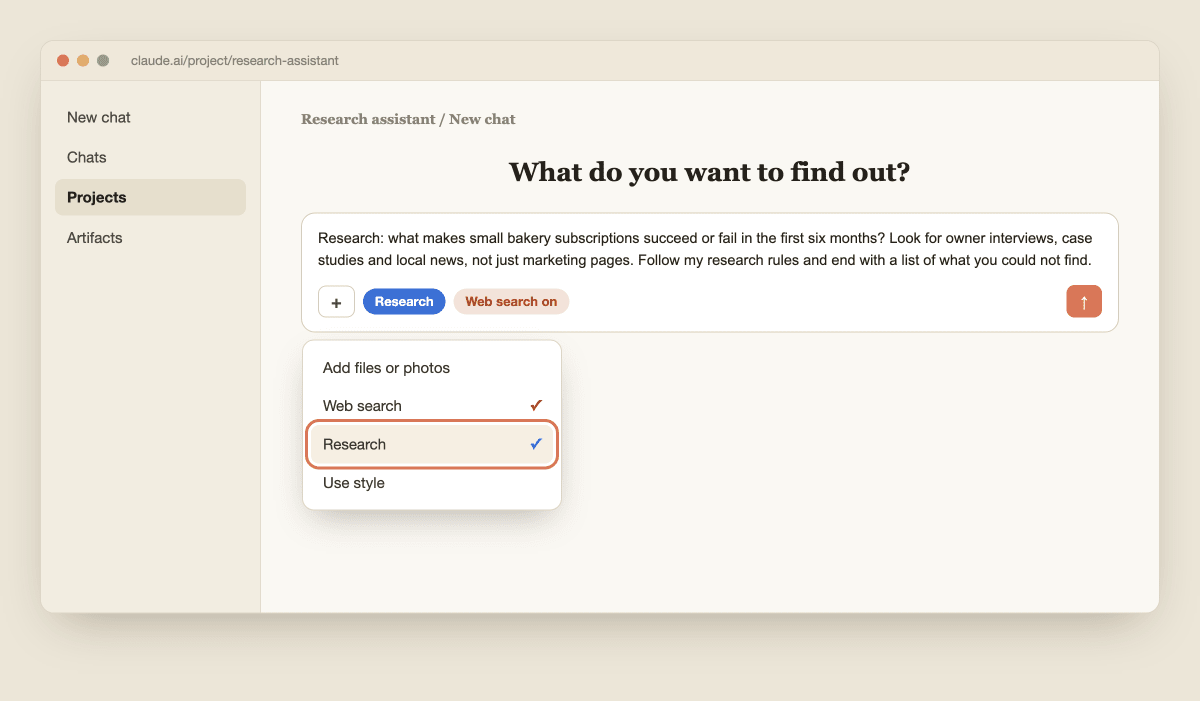
To start it, click + in the chat box and choose Research. Give it one focused question, not your whole brief:
Research: what makes small bakery subscriptions succeed or fail in the first six months? Look for owner interviews, case studies and local news, not just marketing pages. Follow my research rules and end with a list of what you could not find.
On the free plan, skip this step. Run two or three normal web search chats instead, each one on a narrower part of the question.
7. Check the sources before you trust them
This is the step most people skip, and it is the one that makes your research worth anything. Anthropic's own advice is to cross-check cited sources and rely on authoritative ones for important decisions. Ask Claude to help you find the weak spots first:
List every claim in your last answer that rests on only one source, or on a source older than two years, or on a blog or forum. For each one, tell me what official source I should check instead.
Then open the three most important links yourself. Find the sentence the claim came from. Check the date. If the page does not say what Claude said, delete the claim and tell Claude in the chat, so it does not repeat it.

8. Turn it into a one-page brief and save it
Research you cannot find next month is research you will repeat. Ask Claude to turn the chats into one short page:
Write a one-page research brief for Northside Bakery: the question, the short answer, the five strongest facts with their sources, the estimates and how you made them, what is still unknown, and my next three steps. Leave out anything I marked as wrong.
Read it, fix anything that is not right, then save it as a file and add it to the project knowledge. The next time you research something related, Claude starts from what you already know.
If you sell, the same approach works for prospects; see how I set up an AI sales assistant with Claude, and if you later want Claude to read your Google Drive or other apps directly, see how to connect Claude to your business apps.
Claude did the searching and the reading. The decision is still yours, and now it rests on sources you have checked.

